Best Workflow Automation Tools for 2026: Expert Picks
Best Workflow Automation Tools for 2026: Expert Picks

The fastest path to a decision: small teams should start with a low-code connector platform like Zapier or Make. Mid-market teams running structured processes need a hybrid BPA/RPA platform like Workato or Microsoft Power Automate. Enterprises with compliance requirements should evaluate UiPath, Automation Anywhere, or IBM Business Automation. Any organization with deep legacy systems or unique process logic should consider a custom build.
- Small teams (under 50 people): Start with Zapier or Make for quick, no-code wins in days, not months.
- Mid-market teams: Workato or Microsoft Power Automate balance ease of use with enough governance to scale.
- Enterprise: UiPath, Automation Anywhere, or IBM Business Automation for full RPA, AI, and compliance coverage.
- Complex legacy or custom logic: Commission a custom automation build rather than forcing a SaaS platform to fit.
- BPM-heavy processes: Camunda, Nintex, or Oracle BPM when process modeling and orchestration are the core requirement.
Pro Tip: Every major vendor offers a free trial or sandbox environment. Run two parallel pilots on a real process before signing any contract — the gap between a demo and production behavior is where most procurement decisions go wrong.
Key Takeaways
The most effective approach to workflow automation in 2026 is to match the tool class to the process complexity: no-code connectors for quick wins, BPA/RPA platforms for structured enterprise processes, and custom builds for deep legacy integration or unique business logic.
| Point | Details |
|---|---|
| Match tool to complexity | No-code connectors for simple flows; BPA/RPA platforms for structured enterprise processes; custom builds for legacy systems. |
| Governance is non-negotiable | Require RBAC, audit logs, Git-based versioning, and environment isolation before any production deployment. |
| TCO beats sticker price | Add implementation, integration, and maintenance costs to license fees — platforms with low entry prices often carry the highest total cost. |
| Pilot before you commit | Run two parallel pilots on a real process; the gap between a vendor demo and production behavior is where procurement decisions fail. |
| Bigdev for custom builds | When no prebuilt connector fits your stack, Bigdev designs custom automation systems with API integration, AI agents, and built-in observability. |
Table of Contents
- Which workflow automation tools lead the market in 2026?
- How to choose a workflow automation tool for your business
- What are the main types of automation, and which one do you need?
- What does workflow automation actually cost, and how long does it take?
- Governance, observability, and scaling: what executives need to get right
- What most automation programs get wrong
- Bigdev builds custom automations when off-the-shelf platforms fall short
- Sources
Which workflow automation tools lead the market in 2026?
The ten platforms below cover the full spectrum, from drag-and-drop connectors to enterprise hyperautomation suites. The comparison uses the dimensions procurement teams and technical reviewers actually care about.
| Tool | Best for | Pricing model | Ease of use | Integrations | RPA | AI/ML | Deployment | Governance | Ecosystem |
|---|---|---|---|---|---|---|---|---|---|
| Microsoft Power Automate | Microsoft 365 shops, enterprise RPA | Per-user / per-flow | No-code to low-code | 1,400+ connectors | Cloud + desktop flows | Copilot, process mining | Cloud, on-prem, hybrid | RBAC, audit logs, DLP | Large; Microsoft community |
| Zapier | Small teams, fast app connectors | Per-task (Zaps) | No-code | thousands of apps | None | AI steps (beta) | Cloud only | Basic; limited audit | Huge app library |
| Make (formerly Integromat) | Visual, multi-step flows; mid-market | Per-operation | Visual/low-code | over a thousand apps | None | AI modules | Cloud | Moderate | Active community |
| Workato | Mid-market to enterprise integration | Per-recipe | Low-code | more than a thousand connectors | Limited | AI recipes, ML | Cloud, hybrid | Strong RBAC, audit | Partner ecosystem |
| UiPath | Enterprise RPA, attended/unattended bots | Per-bot / per-user | Developer to low-code | hundreds of activities | Full RPA suite | Document AI, agents | Cloud, on-prem, hybrid | Enterprise-grade | Large; UiPath Academy |
| Automation Anywhere | Enterprise RPA + cognitive automation | Per-bot / consumption | Low-code to developer | over a thousand bots and actions | Full RPA suite | IQ Bot, AARI | Cloud, on-prem, hybrid | SOC 2, GDPR, RBAC | Strong; Bot Store |
| Camunda | BPM, process orchestration, microservices | Open-source + enterprise | Developer-first | REST/API native | Limited | Decision engine | Cloud, on-prem, hybrid | Audit, versioning | Developer community |
| IBM Business Automation | Large enterprise, regulated industries | Enterprise licensing | Developer to low-code | Deep IBM/SAP/ERP | RPA included | Watson AI, mining | On-prem, cloud, hybrid | Enterprise; FedRAMP | IBM ecosystem |
| Nintex | Document workflows, process mapping | Per-workflow | No-code to low-code | more than a hundred connectors | RPA add-on | AI forms, analytics | Cloud, on-prem | Moderate | Partner network |
| Oracle BPM | Oracle ERP/cloud shops, large enterprise | Enterprise licensing | Developer-first | Deep Oracle stack | Limited | Oracle AI services | Cloud, on-prem | Strong; SOC 2 | Oracle ecosystem |
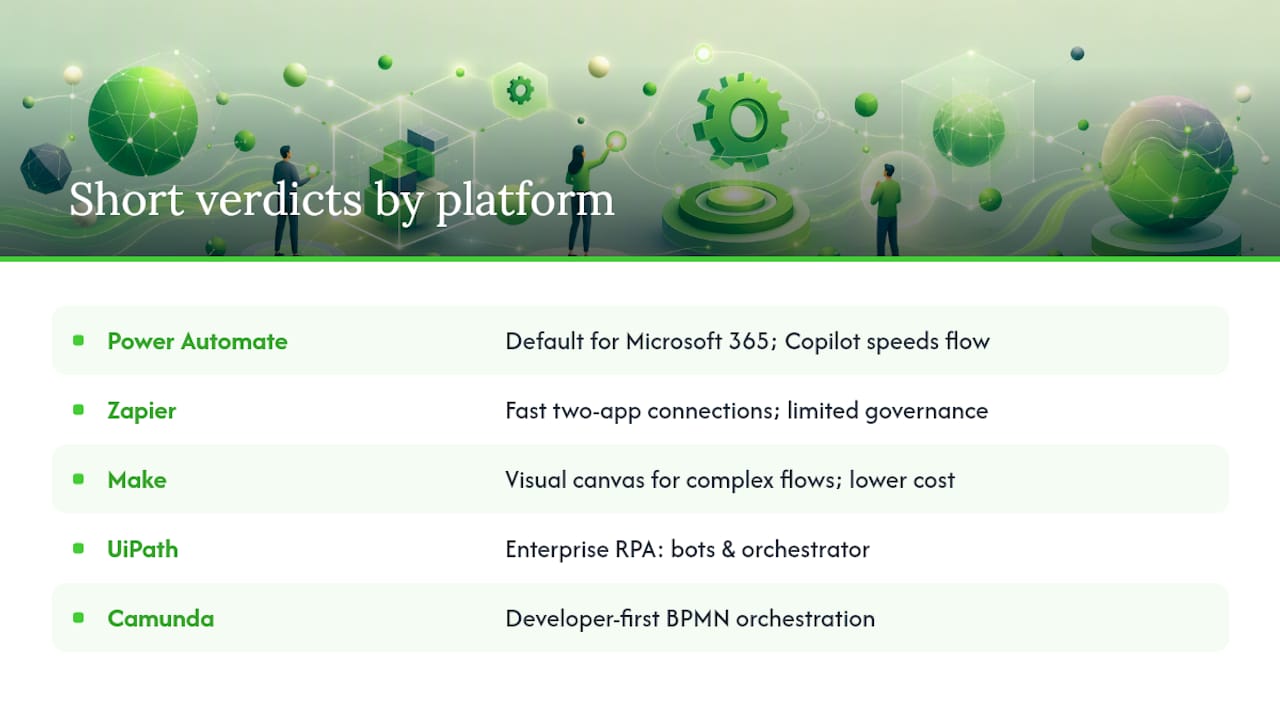
Short verdicts on each platform
Microsoft Power Automate combines cloud flows, desktop flows, process mining, and more than a thousand prebuilt connectors into one platform. If your organization runs on Microsoft 365, the licensing math alone makes it the default first choice. The Copilot integration genuinely speeds flow creation for non-technical users.
Zapier is the fastest way to connect two apps without writing code. It tops out quickly — no RPA, limited governance, and per-task pricing that gets expensive at volume. Use it for quick wins and departmental automations, not mission-critical pipelines.
Make (formerly Integromat) gives you a visual canvas that handles complex, multi-branch flows better than Zapier at a lower per-operation cost. The learning curve is steeper, but mid-market teams running structured data flows find it worth it.
Workato sits in the sweet spot between ease of use and enterprise readiness. Its “recipe” model is approachable for business analysts, and its governance features hold up under IT scrutiny. Strong choice for mid-market companies that have outgrown Zapier but aren’t ready for a full RPA suite.
UiPath is the reference standard for enterprise RPA. Attended bots, unattended bots, document AI, and an orchestrator that handles thousands of concurrent processes — it’s built for scale. The tradeoff is complexity: plan for a dedicated Center of Excellence and meaningful implementation time.
Automation Anywhere competes directly with UiPath at the enterprise level. Its cloud-native architecture and IQ Bot for document processing give it an edge in organizations already running cloud-first strategies. The consumption-based pricing model can be more predictable than per-bot licensing for variable workloads.
Camunda is the right answer when your problem is process orchestration across microservices, not desktop automation. It’s developer-first, BPMN-native, and handles long-running processes and complex decision logic better than any connector platform. Gartner notes that enterprise-grade platforms now combine agentic and deterministic logic with Git-based version control and audit logs — Camunda delivers exactly that for engineering-led teams.
IBM Business Automation targets regulated industries — banking, insurance, government — where the integration depth with IBM and SAP systems and FedRAMP compliance matter more than ease of adoption. Expect a long implementation cycle and significant professional services investment.
Nintex specializes in document-centric workflows: contracts, approvals, forms. It’s not an RPA platform, but for SharePoint-heavy environments where process mapping and document automation are the priority, it fits well.
Oracle BPM makes sense almost exclusively for organizations already deep in the Oracle stack. The integration with Oracle Cloud ERP is tight; outside that ecosystem, the value proposition weakens considerably.
How these picks were chosen
The shortlist was built on six primary evaluation axes: scalability under production load, governance and compliance features, integration breadth, RPA and AI capability, deployment flexibility, and total cost of ownership. Sources include vendor documentation and analyst guidance from Gartner Peer Insights, published technical overviews, and community signals from practitioner forums.
A note on vendor positioning: every vendor markets their platform as the most capable option for every use case. The profiles above deliberately surface the limits of each tool alongside its strengths. No vendor paid for placement.
Evaluation rubric — score each vendor on these axes (1–5):
- Connector breadth and quality for your specific systems
- No-code / low-code accessibility for your business users
- RPA capability (attended and unattended bots)
- AI and document processing maturity
- Governance: RBAC, audit logs, versioning, rollback
- Deployment options matching your data residency requirements
- Total cost of ownership across licenses, implementation, and maintenance
- Vendor support model and community ecosystem
How to choose a workflow automation tool for your business
Before you talk to a single vendor, answer these questions internally:
- Map your target processes. Which three processes, if automated, would have the highest measurable impact on revenue or cost? Name them specifically — “invoice approval” beats “finance processes.”
- Classify the automation type needed. Is this a simple app-to-app connector, a structured rule-based workflow, a bot that interacts with a desktop application, or a cognitive task requiring AI?
- Identify your integration requirements. List every system the automation must touch (ERP, CRM, databases, legacy apps). This single step eliminates half the vendor list.
- Set your governance floor. Does your industry require SOC 2, HIPAA, FedRAMP, or GDPR compliance? If yes, only platforms that document those certifications survive the shortlist.
- Estimate your internal capacity. Do you have developers available, or does this need to be owned by business analysts? The answer determines whether you need a no-code, low-code, or developer-first platform.
Vendor questions worth asking before you sign
- Which connectors are native versus third-party, and what are the SLAs for each?
- Where is data processed and stored? Can you enforce data residency to a specific region?
- What does the audit log capture, and how long is it retained?
- How is role-based access control configured, and can it be scoped to individual workflows?
- Does the platform support Git-based versioning and rollback for workflow definitions?
- What is the support model — shared support queue or a named customer success manager?
- What are the per-transaction or per-operation costs at 10x your current volume?
- Can workflows be extended with custom code, and if so, in which languages?
Red flags to watch for
- No audit trail or logging for workflow execution
- Pricing that hides per-transaction costs until you’re already in production
- No sandbox or staging environment for testing before deployment
- Connector quality that relies entirely on third-party middleware you don’t control
- Vendor lock-in through proprietary data formats with no export path
Pro Tip: Build a TCO model before you evaluate demos. Add license costs, estimated implementation hours (internal and external), integration development, testing, and 12 months of maintenance. Platforms with low sticker prices often carry the highest total cost once integration effort is factored in.
What are the main types of automation, and which one do you need?
Business process automation (BPA) is software-based automation of complex, repeatable, multi-step business transactions — loan approvals, employee onboarding, invoicing — that connects multiple enterprise IT systems to reduce human error and improve operational efficiency. That’s the IBM definition, and it’s the right starting point.
Beyond BPA, three other terms come up constantly in vendor conversations:
Robotic Process Automation (RPA) deploys software bots that mimic user interactions with existing applications — clicking, reading screens, entering data. It’s the right tool when you can’t access an API and need to automate a legacy desktop application. UiPath and Automation Anywhere are the category leaders.
Business Process Management (BPM) focuses on modeling, executing, and optimizing end-to-end processes, often using BPMN notation. Camunda and Oracle BPM are built for this. BPM is the right frame when process visibility and continuous improvement matter as much as execution speed.
Hyperautomation integrates BPA, RPA, AI, and machine learning to handle cognitive tasks — unstructured data like scanned invoices, email intent classification, or document extraction. It’s not a product category so much as an architectural goal: automate everything automatable, including tasks that previously required human judgment.
Use-case matrix
| Process | Best automation type | Example tools |
|---|---|---|
| Invoice processing (structured) | BPA / RPA | Power Automate, UiPath |
| Employee onboarding | BPA / workflow | Workato, Nintex |
| Document extraction (unstructured) | Hyperautomation / AI | Automation Anywhere IQ Bot, UiPath Document AI |
| Microservice orchestration | BPM | Camunda |
| App-to-app data sync | Low-code connectors | Zapier, Make |
| ERP/CRM integration | BPA / enterprise platform | IBM Business Automation, Oracle BPM |
| Incident routing | BPA / BPM | Camunda, Workato |
Core features to compare across any platform
- Connectors and integrations: Native versus third-party; quality of error handling in each connector
- No-code vs. low-code vs. developer-first: Who will own and maintain the automations day-to-day?
- RPA capability: Attended (human-triggered) versus unattended (scheduled/event-driven) bots
- AI and document processing: Can the platform handle unstructured inputs, or only structured data?
- Orchestration: Does it manage long-running, stateful processes across multiple systems?
- Monitoring and observability: Real-time dashboards, alerting, and execution logs
- Governance: RBAC, audit trails, change management, and environment isolation
Low-code platforms that combine drag-and-drop editors with AI assistance can significantly speed early development — but growing organizations must plan for orchestration and governance before those early wins create technical debt.
What does workflow automation actually cost, and how long does it take?
Pricing models across the market fall into four shapes:
- Per-user / per-seat: Common in Microsoft Power Automate and Nintex. Predictable for fixed team sizes; expensive when you want broad organizational access.
- Per-flow / per-workflow: You pay for the number of active automations. Works well for focused deployments; costs scale with automation breadth.
- Per-bot / per-task: Standard in RPA platforms (UiPath, Automation Anywhere). Consumption-based variants tie cost to execution volume, which suits variable workloads.
- Enterprise licensing: IBM Business Automation and Oracle BPM typically negotiate annual contracts based on process volume, users, and deployment scope.
Ballpark cost bands
Small teams running a handful of automations on a no-code platform can expect relatively low monthly costs. Mid-market deployments with significant integration complexity tend to incur higher monthly costs, before implementation. Enterprise RPA programs with vendors like UiPath or Automation Anywhere often involve substantial annual investments, scaling with bot count and process volume.
The hidden cost driver in every deployment is integration effort. Connecting a platform to a legacy ERP or a custom database rarely uses a prebuilt connector. Budget for custom API development, data mapping, and testing time regardless of which platform you choose.
Implementation timeline
- Pilot (2–6 weeks): One process, one team, controlled environment. Goal: validate the platform fits your technical stack and your team can operate it.
- First production automation (4–12 weeks): Includes requirements, build, testing, and change management. Timeline extends when legacy system access is slow or data quality is poor.
- Departmental rollout (3–6 months): Expand to 5–20 automations with a governance framework in place.
- Enterprise-wide program (6–12 months): Center of Excellence, reusable components, CI/CD pipeline for automations, and org-wide change management.
What consistently extends timelines: unclear process ownership, missing API documentation for legacy systems, and governance requirements that weren’t scoped at the start.
Governance, observability, and scaling: what executives need to get right
Governance and observability are not optional features to add after launch — they are prerequisites for any automation running in production. Enterprise platforms in 2026 that combine agentic AI-driven logic with deterministic rule-based execution, including Git-based version control, RBAC, and audit logs, are now the baseline expectation for enterprise buyers.
Governance checklist
- Role-based access control scoped to individual workflows and environments
- Immutable audit logs capturing who changed what and when
- Git-based versioning for workflow definitions with diff views and rollback
- Separate development, staging, and production environments
- SLA monitoring with alerting on execution failures and latency spikes
- Human-in-the-loop controls for high-risk decisions (approvals, exceptions)
- Documented incident response process for automation failures
Scaling pattern: from pilot to enterprise program
- Establish a central automation platform with a defined governance model before scaling.
- Build reusable components (connectors, error handlers, logging templates) that teams share rather than rebuild.
- Implement CI/CD for automation deployments — treat workflow code like application code.
- Require automated testing for every workflow before promotion to production.
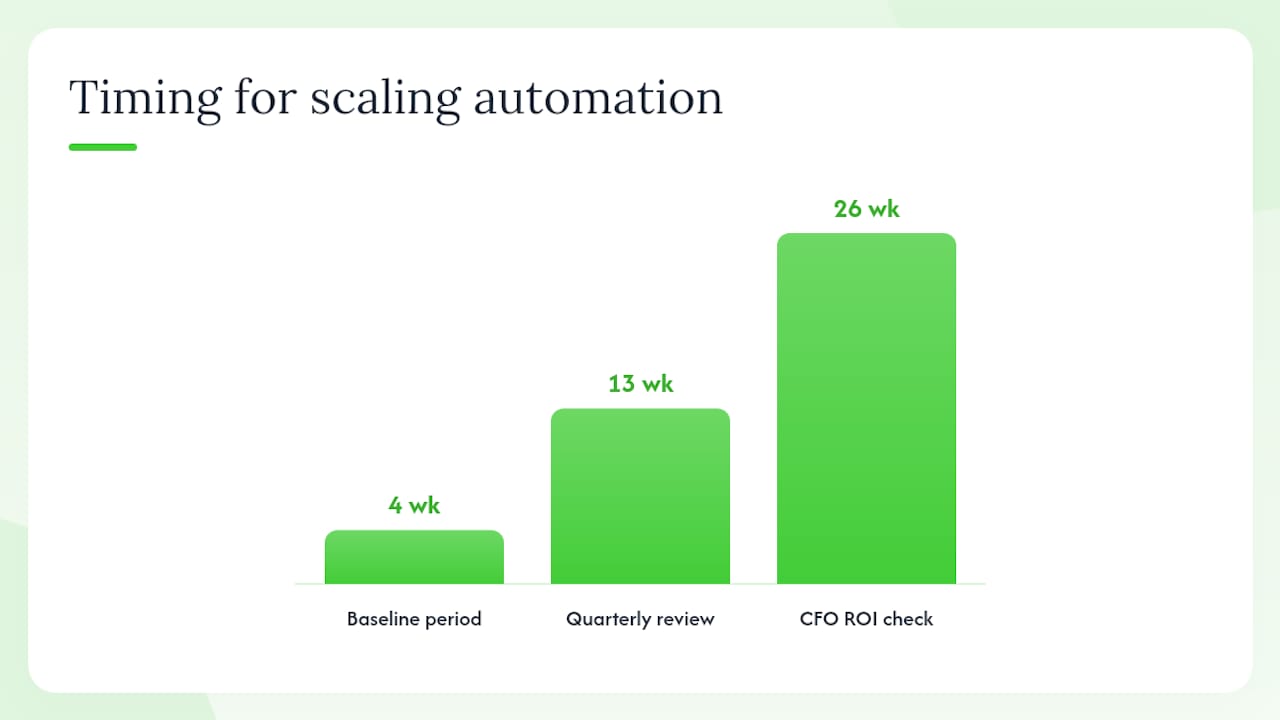
- Run a quarterly automation health review: deprecate unused flows, update connectors, and measure ROI against baseline metrics.
Pro Tip: Before deploying any AI-enabled automation at scale, build observability first. Log every decision the agent makes, define the conditions that trigger a human review, and set a rollback threshold. Agentic automations that fail silently are harder to recover from than a broken connector.
Developer-friendly platforms that offer hybrid UI-plus-code models — with replayable steps, workflow diffs, and isolated environments — give engineering teams the control they need to operate automations safely at scale. That architecture matters more than the vendor’s marketing claims about ease of use.
Pro Tip: Measure ROI against a documented baseline before you automate. Track the time per transaction, error rate, and cost per process for four weeks before go-live. Without that baseline, you can’t prove the program’s value to the CFO six months later.
What most automation programs get wrong
The conventional wisdom says: pick the platform with the most integrations and the lowest learning curve, run a pilot, then scale. That advice produces a specific failure mode — automation bloat, where dozens of point-to-point flows accumulate without centralized design or observability, and no one knows which ones are still running or why.
The more useful frame is to treat automation as an evolving business capability, not a project with a go-live date. The organizations that get the most from their automation investment are the ones that build a reusable architecture from the start: shared components, versioned workflows, and a governance model that scales with the program.
There’s also a tendency to underestimate the custom integration problem. No-code connectors work well when your systems are modern and well-documented. The moment you need to integrate a 15-year-old ERP, a proprietary database, or a system with no public API, the connector library becomes irrelevant. That’s when the choice between a platform and a custom build becomes a real decision, not a theoretical one.
The platforms in this guide are genuinely capable. But the best workflow automation tool for your organization is the one that fits your actual systems, your actual team, and your actual governance requirements — not the one with the best demo.
Bigdev builds custom automations when off-the-shelf platforms fall short
Off-the-shelf platforms cover a lot of ground. When they don’t — when your process involves a legacy system with no API, a unique business logic that no connector handles, or a compliance requirement that a SaaS platform can’t meet — a custom-built automation is often the faster and cheaper long-term path.
Bigdev designs and builds custom automation systems for small and mid-sized businesses: API integrations connecting your existing stack, AI agents that handle document processing and routing, automated workflows with built-in observability and audit logging, and ongoing support after go-live. Every project starts with a scoping session to map your processes, identify integration points, and define what “done” looks like before a line of code is written. If your process doesn’t fit a prebuilt connector, book a discovery call and get a straight answer on whether a custom build makes sense for your situation.
Sources
- Gartner